Part 1: Making things
Part 1 of the manual of Sema-tawy. If you’re a developer and want to know the inner workings, see part 2.
This part is for anyone who’d like to make the game their own: new stacks, new pictures, different words, a harder journey up the Nile or a kinder one. You don’t need to be a programmer to do any of that. Nearly all of it is plain text in small files that explain themselves. A few things need a little code and chapter 9 walks you through that line by line.
Don’t worry about breaking anything! Every time you build the game, it checks all of your work first. If something is wrong, it tells you which file and line the mistake is in and what to do about it. Your last working game stays exactly as it was until you’ve fixed it.
Where else to look
- Part 2 is for developers. It explains how the game works on the inside.
- The content reference lists every setting of every kind of file. It’s handy when you need the exact name of something.
- How hard it is says what makes a journey hard and what each number was measured to do.
- Reading the code is a gentle way into the code itself.
Contents
- Getting ready
- The quick way
- How the game is put together
- The words the game uses
- Pictures
- Words and numbers
- Adding something new
- Is it fair? Checking the balance
- When the list isn’t enough: a little code
- If something goes wrong
- Sharing your version
1. Getting ready
What you’ll do: install two programs and build the game. Time: about 15 minutes.
You need two programs and a third is good to have. All of them are free.
A text editor. This is a program for changing plain text files.
- We’d recommend VS Code. It works on every computer and colours the text for you, which makes a missing quote mark much easier to spot.
- Notepad++ on Windows or TextEdit on a Mac work too. In TextEdit, choose Format → Make Plain Text before you save.
- Please don’t use Word or Pages! They add hidden formatting that the build can’t read.
Python 3. This is the programming language the build is written in, so your computer needs it to build the game.
- On Windows, double-click
build.bat. If a window tells you that Python can’t be found, download it from python.org. While it installs, make sure to tick the box that says Add Python to PATH. - On a Mac or on Linux, it is often already there. Open the Terminal app, type
python3 --versionand press Enter. If you see a version number such asPython 3.12.4, you’re ready.
Node.js (good to have). With it, the build deals every stack with the game’s own rules and checks that each one can be cleared and the balance tools of chapter 8 can run. Get it from nodejs.org. Without it the game still builds.
Building the game
“Building” turns all of the small files into the game.
- On Windows: double-click
build.bat. - On a Mac or on Linux: open Terminal, type
cd(with a space after it), drag the game’s folder onto the window and press Enter. Then typepython3 build.pyand press Enter.
You should see: a few lines ending with one that starts Done: dist/sema-tawy.html. The game has been built! Open that file (in the dist folder) in your browser and play a stack.
That one file is the whole game. You can copy it anywhere, send it to a friend or keep it for twenty years and it will still work. It never goes online.
Keep a copy before you start. Duplicate the whole folder. If you ever get lost, you can always go back to the copy.
2. The quick way
What you’ll do: make a new boon and see it in the game. Time: about 5 minutes.
This is the way we’d recommend for adding anything new.
1. Let new.py start it for you. On Windows, double-click tools/new.bat and answer its two questions. On a Mac or Linux, type:
python3 engine/tools/new.py boon "Eye of Ra"You should see: Made content/boons/9-eye-of-ra.jsonc. Open that file. It already works: every line has a comment above it saying what it is for, so you can build and see it before you change anything at all. These are the things new.py can start:
| Name | What it makes |
|---|---|
stack | a new stack (a layout), in content/layouts/ |
boon | a boon, used once from the satchel |
relic | a relic, kept for a whole journey |
omen | an omen, which makes a tomb or a great stack harder |
event | something that happens on the river: a few lines and a choice |
look | a tile look: a content file and its stylesheet |
2. Let the game build itself. Type python3 build.py --watch and leave the window open. From now on, every time you save a file, the game is built again by itself. If you make a mistake, you’ll know at once. To stop it, close the window or press Ctrl+C.
3. Try it out in try-out mode. Add ?try to the end of the game’s address in your browser’s address bar: dist/sema-tawy.html?try. Try-out mode is a copy of the game meant for testing, with a save of its own, so your real journey is never touched. Every stack is open in it and a small red label in the corner reminds you where you are. After each change, simply reload the page.
| Add to the address | What it does |
|---|---|
?try | free play, every stack open |
?try&layout=cat | straight to a stack: any whose file or name has that word in it |
?try&run | a journey at once, on the first level |
?try&run=demanding | a journey on another level (gentle, standard, demanding or fierce) |
?try&music=festival | another style of music (the files in content/music/styles/) |
?try&tiles=70 | the tiles at another size, in pixels (50 to 120) |
3. How the game is put together
Before you start changing things, it helps to know what each folder is for and what the build does with it.
| Where | What’s in it |
|---|---|
content/ | Everything a player sees or reads that isn’t a rule: the stacks, the boons, relics and omens, the places on the map, the river’s stories, the looks. One small file for each thing. This is where you’ll do almost all of your work. |
content/settings.jsonc | Every number: the levels, the map, the money, how hard stacks get, the help, free play and the daily challenges |
edition.jsonc | What makes this game this game: its name, the kinds of amulet, the first look, the music, which sound and effect plays for what, the tutorial, How to play and every word on screen |
images/ | Every picture. images/README.md lists every folder and how its files are named; images/CREDITS.md says where each came from |
web/ | The stylesheets: how tiles, cards, pages and the scenery look |
engine/ | Plinth, the engine: the rules, the drawing, the sound and the screens. It knows nothing of Egypt. You only need to open it in chapter 9 |
tools/ | Helpers: the scripts that draw stacks, tables and sets of amulets, the docs’ pictures, the website |
dist/ | What the build makes. Never change anything here: it is made again every time |
Inside content/:
| Folder | One file for each |
|---|---|
layouts/ | stack (52 of them) |
boons/, relics/, omens/ | boon, relic and omen |
places/ | kind of place on the map: a stack, a market, a shrine, a tomb, an oasis, the river, the great stack |
events/ | thing that can happen on the river |
specials/ | special amulet (gold, turquoise, veiled, sealed, rubble, the Sons of Horus, covered, wild): its card and colours |
looks/, sets/, pages/, tables/ | tile look, set of amulets, page style and table |
music/ | style of song, with the hand drums’ rhythms and the tunes written by hand |
What the build does
When you build, engine/build.py goes through five steps:
| Step | What happens |
|---|---|
| 1. Read | It reads edition.jsonc, every file in content/ and every picture. |
| 2. Check | It checks every setting. It deals every stack with the game’s own rules and makes sure each one can be cleared. |
| 3. Connect | It checks that everything a file mentions exists. If a boon uses the picture eye, there has to be an eye.svg. |
| 4. Put together | It turns the pictures into one set of drawings, scopes each look to itself and puts the checked content into the code. |
| 5. Write | It writes one file, dist/sema-tawy.html. |
If step 2 or 3 finds a problem, step 5 never happens. Instead, the build tells you the file, the line and what to do about it.
This is also why the code never needs to know that your new boon exists. Once its file is there, it turns up in markets and shrines, in the satchel and in How to play, all by itself.
New players meet the game a bit at a time. The first time the game opens, a short tutorial plays on a small stack of its own. In the first journeys, tips point at the bar, the shuffles and each special amulet the first time it turns up. Try-out mode has all of that too, so you can see a new special amulet’s card the way a new player would.
In the engine: part 2, chapter 5, The build says more about each step.
4. The words the game uses
The files and this manual use the game’s own names for its pieces all the time, so here they are.
| Word | What it is |
|---|---|
| Stack | The pile of amulets the player takes apart, shaped like a pyramid, a temple, a cat. Its file is a layout. |
| Amulet | One tile of the stack, with the picture of an amulet on it. Two alike make a pair. |
| Free | An amulet with nothing on top of it and nothing touching it on its left or on its right. Only free amulets can be taken. |
| Kind | Which amulet a tile shows: the scarab, the ankh. A set of kinds is the group of kinds a stack is dealt from. |
| Shuffle | Deals the amulets left again, in the same places, in an order that can be cleared. |
| Journey | The long game: up the Nile across a map, in three seasons (Akhet, Peret and Shemu), each of eight rows. |
| Place | A stop on the map: a stack, a market, a shrine, a tomb, an oasis or the river. The top of each season is its great stack. |
| Level | How hard a journey is: Relaxed, Normal, Hard or Pharaoh. |
| Life | Stuck on a stack with no shuffle left, a stack is lost and a life with it. |
| Deben | Copper rings, the money of a journey. The deben left when a journey is won are its score. |
| Turquoise | The rare money that comes home, for new looks in Customise. |
| Boon | A help used once, from the satchel in the bar. |
| Relic | A help kept for a whole journey, working on its own. A won journey brings its relics home, each opening a look. |
| Omen | A hardship on a tomb or a great stack. |
| Special amulet | One that is not quite plain: gold (worth more), turquoise, veiled (showing only its back), sealed, rubble (crumbles after a while), covered (under sand, water, beads and more) or one of the Four Sons of Horus (any two make a pair). |
| The Gods | Once a journey, stuck with no shuffle left, the Gods can deal a stack again. |
| Look | Anything that changes only how the game looks: tiles, sets of amulets, page styles, tables, pair effects. |
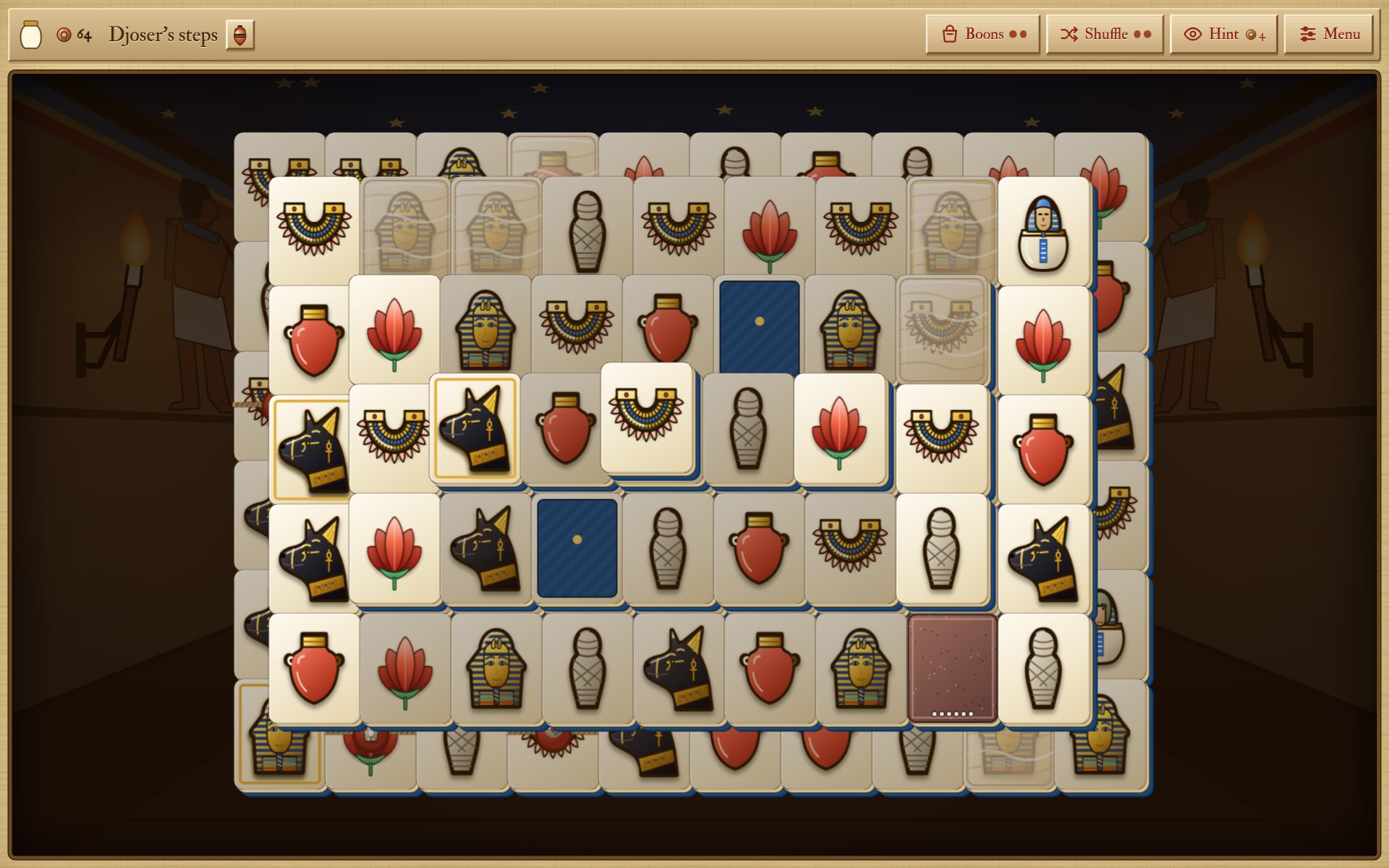
A tomb on a journey. The bar at the top has the jar that fills as the stack empties, the deben, the stack’s name and its omen, then the satchel of boons, the shuffles, a hint and the menu. On the stack are gold, veiled, sealed and covered amulets and a stone of rubble.
5. Pictures
Every picture in the game is a file in images/. To change one, replace the file with your own, keeping the same name and build.
Try it first
- Open
images/amulets/scarab.svgin a text editor. It’s a drawing written as text. - Find a colour in it, such as
fill="#f5d04e"(the gold) and change it tofill="#c0392b", a red. - Save, build and play a stack.
You should see: every scarab’s gold is now red. Change the colour back (or copy the file back from your copy of the folder) to undo it.
Where each picture goes
The pictures are SVG files: drawings made of shapes rather than dots, so they stay sharp at any size. You can open one in Inkscape, which is free, change it and save it under the same name.
| Folder | What goes in it | Name the file after |
|---|---|---|
amulets/ | the plain amulets on the tiles: square (128 × 128), with a see-through background | the kind: scarab.svg. A new name is a new kind of amulet |
amulet-sets/<set>/ | a set’s own pictures of the same amulets | the kind, as above |
cards/ | the pictures on cards, the map and the buttons and the covers (cover-amber.svg) | what uses it: a boon’s "picture" names one |
backdrops/ | the scenery a stack is laid on: wide, with whatever matters near the middle, as the edges are cut off on some screens. Each also needs a rule in web/css/60-scenery.css | the place: giza.svg |
tables/ | the tables the stack lies on | the table |
icons/ | the app’s icon | fixed names |
Make amulets easy to tell apart. Players know amulets by their colour first and their shape second. Two kinds of the same colour in one set are hard to play, even when their shapes differ. The build checks nothing of this: look at a whole stack before you keep a new picture.
To give a boon another picture, change its "picture" to the name of any file in images/cards/ or images/amulets/, without .svg.
Pictures drawn by a script
Some pictures are made by scripts in tools/ and the top of each file says so:
| Script | What it draws |
|---|---|
tools/draw-layouts.py | many of the stacks (you draw the bottom layer, it raises the rest) |
tools/draw-tables.py | the tables |
tools/draw-covers.py | the covers |
tools/amulet-sets/draw.py | Painted relief, carved cedar, ivory label and tomb painting, from every amulet’s outline (shapes.py, copied from Amulets of Anubis) |
tools/scenery/ | five pieces of scenery, in the manner of Amulets of Anubis’ |
tools/draw-icon.py | the app’s icon |
If you edit one of those pictures by hand, don’t run its script again, or it draws the old picture right back. Better still, change the script.
A word on sizes. Every picture goes inside the game’s one file, so keep them small: a big picture makes the game bigger to download and uses more of a phone’s memory. SVGs are usually tiny. If you use a photo, make it no bigger than it needs to be.
6. Words and numbers
How a content file is written
Almost everything you’ll change is a small text file in a format called JSON. (Strictly, JSONC: “JSON with comments”, which is why the files end in .jsonc.)
Here is a boon:
// A boon: used once, when the player chooses.
{
	"id": "eye",
	"name": "Eye of Horus",
	"text": "Shows a pair.",
	"picture": "eye",
	"effect": "show-pair",
	"price": 18
}
Each line between the curly brackets { } is one setting, in two halves with a colon between them:
- The left side is the key (
"price"). It is the game’s own name for this piece. Don’t change it: the game looks for exactly that name. - The right side is the value (
18). This is the part you change.
Values come in a few kinds:
| Kind | Looks like | Used for |
|---|---|---|
| Text | "Eye of Horus", between double quotes | names, lines, ids |
| A number | 18, without quotes | prices, amounts, how many |
| Yes or no | true or false, without quotes | turning something on or off |
| A list | ["sand", "water"], between square brackets | several values of the same kind |
| A group | { "coins": 5 }, between curly brackets | settings that belong together |
A few rules keep a file readable for the build:
- Put a comma after each setting, except the last one before a
}or a]. - A line that starts with
//is a comment: a note for people, which the game ignores. - Every
{has its}and every[its]. - An apostrophe inside text is fine (Khufu’s). A double quote (
") is not, as it would end the text early. Use the curly ones (“ ”) instead.
If you get one of these wrong, don’t worry: the build tells you the file and the line.
The id. Most files start with an "id". Once people have played, leave it alone: saves remember things by their id.
Every word on screen: edition.jsonc
Every word the game’s own screens show is in edition.jsonc, under "text". Find the words, change them between their quotes, save and build.
"text": {
	"new": "New deal",
	"shuffle": "Shuffle",
	"left": "{n} amulets left",
Change the text on the right and leave the key on the left alone. Words in curly brackets, such as {n} or {season}, are filled in by the game: keep them, but move them around the sentence as you like.
The names and lines of boons, relics, omens and places are in their own files in content/ and the river’s stories in content/events/.
How we write. British English, short and plain: a card has room for one line. Buttons and rules are read in a hurry, so they stay in the present tense and to the point. The river’s stories and How to play’s openings can have more flavour: the river’s in the travellers’ voice (“we”), How to play speaking to the player.
How to play
How to play is in edition.jsonc too, under "text", "help": a list of chapters, each with a title, an icon, a first line ("lede") and its blocks.
{
	"title": "Taking pairs",
	"icon": "amulets",
	"lede": "Two alike, both free: that is the whole rule.",
	"blocks": [
		{ "show": "pair", "p": "Tap an amulet, then its twin. Off they go." },
		{ "h": "Choosing well" },
		{ "p": "Every stack can be cleared, but not in every order." }
	]
}| Block | What it shows |
|---|---|
{ "p": "..." } | a paragraph |
{ "h": "..." } | a heading |
{ "items": [[picture, name, line], ...] } | a list with a picture beside each |
{ "show": "pair", "p": "..." } | a little stack drawn beside the words (pair, free, wrong or shuffle) |
{ "levels": true }, { "places": true }, { "coins": true }, { "bar": true }, { "specials": true } | filled in by the game from the content, so they stay true when you change it |
{ "cards": "boons" } | every boon’s card (or "relics", "omens") |
To add a chapter, copy one and change it.
The tutorial is in edition.jsonc as well, under "tutorial": its small stack and its steps, each with a line the game’s label shows when its moment comes. Change the words freely. If you change the stack, keep it so that only one pair can be taken at a time, or the steps point at the wrong amulets. How to play’s “Learn by playing” plays it again.
The numbers that tune the game: content/settings.jsonc
Every number that makes a journey easy or hard is in content/settings.jsonc, under "run", each with a comment. These are the ones you’re most likely to change:
| Setting | What it does |
|---|---|
"levels" | each level, from the gentlest up: its shuffles and lives, kinds (more or fewer kinds of amulet), undo (pairs that can be put back on each stack), warn (a notice before a dead end), askGods and wins (what the balance check aims at). Keep each level’s id: saves remember it. Its name and line are in edition.jsonc ("levels", "levelText") |
"mercy" | stuck with this many amulets or fewer, they are dealt again for nothing |
"askGods" | how many times a journey, stuck with no way on, the Gods deal the stack again |
"start" | the gentle start of a journey: how many rows, which stacks and how forgiving |
"seasons", "rows" | how many seasons a journey has and how many rows each one |
"map" | how the map is drawn: its rows’ widths and its pattern, which says what each row of a season is (stacks, stops, the oasis, the great stack) |
"depth" | how hard stacks get as the map climbs: from which row on there are more kinds of amulet, which special ones, how often an amulet lies on its own twin (tricky) and how hard the deal is chosen to be (trap) |
"seasonLayers" | how deep each season’s stacks are, in layers |
"shapes" | how a phone’s shapes and a computer’s are dealt differently, so both play about as hard |
"choose" | how each stack’s deal is chosen: so many deals tried, the one nearest the row’s trap kept |
"coins", "shop" | what earns deben (a pair, a gold amulet, a cleared stack, a run of pairs), what a hint costs and what markets ask |
"free", "days" | free play and the daily challenges: their shuffles, help and deal |
"gems" | how often a turquoise pair turns up and how much turquoise a won journey and the challenges bring home |
"tips", "nextAfter" | tips in the first journeys and after how many journeys won home suggests the next level |
Important: never rename a level’s id (
gentle,standard,demanding,fierce). Saves rely on them.
An example: a gentler Normal. Give Normal one more shuffle:
"standard": { "shuffles": 3, "coins": 0, "undo": 0, "warn": true, "wins": [95, 70] },Build, then check the balance (chapter 8). Measured, one shuffle more on Normal lets a careless player win about 19 more journeys in a hundred on a phone. How hard it is lists what each number was measured to do, so you can pick the one that moves the game as much as you want.
Prices and the places on the map
- Boons and relics each have a
"price"in their own file and a"rarity"(common,rareorwondrous): the rarer ones turn up less often and only higher on the map. - Looks for sale have a
"price"in turquoise in their own file. - The places (
content/places/) say how often each turns up ("weight"), from which row ("from_row"), what it gives, sells or asks and its scenery. A place is put together from the engine’s building blocks; the content reference lists them.
7. Adding something new
Whatever you add, it’s always done the same way:
- Make it with
new.py(chapter 2), or copy the nearest file by hand. - Rename a copy with the next number and a new name.
new.pydoes this for you. - Change its
idand whatever else you like. - Build and try it in try-out mode.
The number at the front of a file name decides its place in lists. 9-eye-of-ra.jsonc comes after 8-bes.jsonc.
A stack
What you’ll do: draw a new stack and play it. Time: about 15 minutes.
python3 engine/tools/new.py stack "The ibis"Open the new file in content/layouts/. A stack is drawn in layers, from the table up. In each row, # is an amulet and . is an empty place:
"layers": [
	{ "rows": ["########", "########", "########", "########"] },
	{ "shift": [1, 1], "rows": ["######", "######"] },
	{ "shift": [1.5, 1.5], "rows": ["#####"] }
]
Seen from above, that stack looks like this, the numbers being how high each spot is piled:
1 1 1 1 1 1 1 1
1 2 2 2 2 2 2 1
1 2 2 2 2 2 2 1
1 1 1 1 1 1 1 1
(with the top five sitting between the second layer’s amulets).
- The first layer lies on the table. Each next one lies on top of it.
"shift": [1, 1]moves a layer one place right and one down. Half places (0.5) set an amulet between two below it, as in a real mahjong stack.- A stack must have an even number of amulets: they go in pairs.
"tall"(optional) is the same stack drawn narrower, for a phone held upright. Keep it to about ten across, or the amulets grow small. A"phone"shape can be narrower still, for small phones."found": truekeeps it out of free play until a journey has cleared it. Remove the line to offer it at once."music"gives the stack its key, scale and lead instrument (harp,lyre,oud,fluteorbell): the music is made as you play, in that key.
Build. The build deals your stack with the game’s own rules and tells you if it can’t be cleared. Then try it: dist/sema-tawy.html?try&layout=ibis.
Most stacks are drawn by a script instead, tools/draw-layouts.py: you draw only the bottom layer and it raises the layers above, the way a mahjong stack is built. Its comments say how.
Easy or hard? A stack is harder when it is one wide piece, with long rows that only open from their ends. A stack that falls into several separate piles is easier: each pile comes apart by itself. node engine/tools/sim.js (chapter 8) tells you how often the bot clears it.
A boon, a relic or an omen
What you’ll do: add a relic that gives a shuffle back at every oasis.
python3 engine/tools/new.py relic "Water of the oasis"The file explains every line. The most important one is "effect": what it does. You choose it from the engine’s list, which the file names. This one wants "gift-more", which gives more at a place’s gift, with the number it works with:
{
	"id": "oasis-water",
	"name": "Water of the oasis",
	"text": "An oasis gives one shuffle more.",
	"picture": "lotus",
	"effect": "gift-more",
	"shuffles": 1,
	"price": 40,
	"rarity": "rare",
	"opens": ["table:marsh"]
}
"opens" is the look this relic opens for good when a journey carrying it is won: look: (tiles), set:, table: or effect: (a pair effect), then its id.
The effects the engine knows:
- Boons:
show-pair,deal-again,put-back,see-veiled,take-with-kind,wild,take-kind,swap - Relics:
stuck-shuffle,top-double,free-hint,kind-run-shuffle,pair-coins,every-pairs-boon,streak-forgives,group-relic,stack-shuffles,rubble-sooner,rich-double,clears-shuffle,gift-more,stuck-take-pair,veil-neighbour,event-coins,shop-cheaper,rich-opens-seals,gems-twice - Omens:
more-kinds,veil-bottom,night,blind,seal-ring,no-hints
The content reference says what each does and which numbers it takes. A new boon or relic turns up in markets, shrines and tombs at once and its card appears in How to play.
If the effect you’d like isn’t in the list, chapter 9 shows you how to add one.
Something on the river
python3 engine/tools/new.py event "A lost goat"Write what happened in the travellers’ voice (“we”, a dry smile, two or three sentences), then two or three choices. Each choice "gives" deben, shuffles, a boon or a relic, or takes them (a number below nothing):
"text": "A goat stood on the bank, bleating at us as if we owed it money. Perhaps we did.",
"choices": [
	{ "text": "Take it aboard", "gives": { "coins": -5, "boon": "any" } },
	{ "text": "Sail on", "gives": {} }
]
"any" gives one chosen by chance. A choice that would take more than the player has can’t be chosen, so always keep one that costs nothing.
Keep the facts true. The travellers look, ask and learn. What they tell is history: documented, never invented.
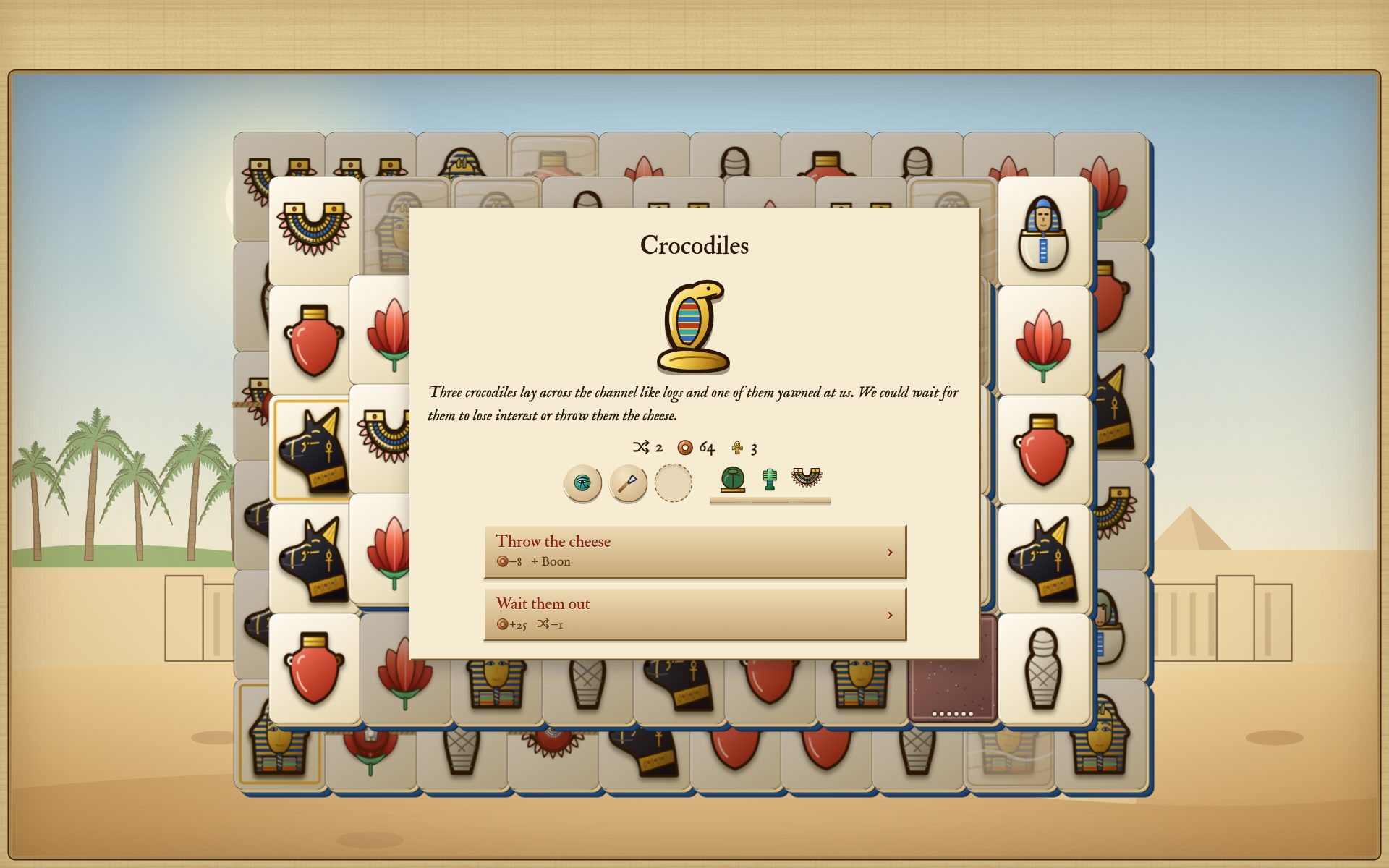
A place on the map
Each kind of place is a file in content/places/, put together from the engine’s building blocks: a stack, a shop, a choose (boons to take one from), a gift, an event and a reward. A tomb, for example, is a stack with an omen and a relic as its reward:
"stack": { "size": "row", "omen": true, "cover": ["sand", "bandages"], "covered": 6 },
"reward": { "coins": "clear", "relic": { "choose": 3 } }
A new file is a new kind of place. Give it a "weight" (how often it’s drawn), a "group" (which rows of the map’s pattern it can fill) and a picture. The content reference lists every block.
A cover
Covered amulets lie under something: alabaster, glass, beads, amber, sand, bandages, water, vines. A cover is only a picture, images/cards/cover-<name>.svg. To add one, draw it (or let tools/draw-covers.py draw it) and add its name to "covers" in content/settings.jsonc, or to a place’s own "cover" list. No code at all.
New looks
Looks change only how the game looks. Each is a file and a look for sale has a "price" in turquoise; one without a price is everyone’s, unless a relic opens it.
- A tile look (
new.py look "Carnelian") makes a content file and a stylesheet inweb/looks/. The stylesheet is CSS; its comments explain the one special word,extrude(), which draws a tile’s thick side. - A set of amulets is a folder
images/amulet-sets/<id>/with a picture for every kind, named after it and a file incontent/sets/naming the folder. A kind you leave out keeps its plain picture.tools/amulet-sets/draw.pydraws a whole set in a style of its own from every amulet’s outline. - A table is a picture in
images/tables/and a file incontent/tables/. - A page style is a file in
content/pages/and a stylesheet inweb/pages/.
Your own music
The music is made as you play, in each stack’s own key. A style of song (content/music/styles/) says its tempo, its rhythms, which instruments play and how its sections follow each other; its comments explain each line. Hear one with ?try&music=<its id>. The tunes the songs come back to are written by hand in content/music/tunes.jsonc.
8. Is it fair? Checking the balance
What you’ll do: let a bot play many journeys, to find out how hard the game is.
Judging difficulty by playing is hard: you get better as you go and a few games are too few to tell. So the game comes with pretend players that play thousands of times and count. They need Node.js. In Terminal, in the game’s folder:
node engine/tools/sim.js 200plays every stack 200 times and says how often the bot clears it alone and with one shuffle. Most stacks should be cleared well over half the time alone and nearly always with a shuffle.
SHAPES=phone node engine/tools/difficulty.js 200is the one to run after changing a level. A careful player and a careless one play 200 whole journeys at every level. It takes twenty minutes to half an hour and keeps every core of your computer busy.
You should see: a table of how many journeys each player won, against the "wins" each level aims at, the lives lost and the deben left; then how often each row of a journey is cleared without getting stuck, how stacks are lost and how often the help was needed. The levels are tuned on a phone’s shapes; SHAPES=wide plays a computer’s.
What to aim for: within 7 of each level’s aim. On Normal now, a careful player wins about 94 journeys in a hundred and a careless one 64.
node tools/levers.js 200changes one number at a time on a copy of your content (your own files are never touched) and says how much each moves the wins on Normal. Put a level’s id after the number to try another.
How you really play can be measured too. Build with python3 build.py --debug and play dist/sema-tawy-debug.html: it notes everything you do, on your own device (nothing is sent anywhere). Its menu’s Play log saves it as a file and
node engine/tools/play-log.js sema-tawy-log.jsonsays what you pick and pass over, how long a pair takes you, where you get stuck and, for every stack lost, the pair after which it could no longer be cleared.
A pretend player can then play like you:
node engine/tools/fit-player.js sema-tawy-log.json
PLAYER=player.json node engine/tools/run-sim.js 200
The first learns from your logs what you look at when you choose a pair, how often you see a trap coming, where you go on the map and how quickly you play; the second plays journeys that way and says how many you would win and how long one would take you. The more logs you give it, the surer it is.
How hard it is has the results we measured and what we learned from them.
9. When the list isn’t enough: a little code
Everything so far uses what the engine already knows: a boon’s "effect" is one name from a list. Now and then you may want something we didn’t think of: a boon that lifts every cover at once, say. That takes a few lines of JavaScript, the language the engine is written in.
You don’t need to be a programmer. Most new things start as a copy of something that already does something similar and we’ll explain every line. The code is written plainly on purpose, with small functions that say what they do.
The bits of JavaScript you’ll come across
Here are the few things you’ll see again and again. You don’t need to learn them by heart: come back here whenever a line doesn’t make sense.
The dot: “the part of … called …”. A dot opens a bundle and picks one thing out of it:
stack.gone        // the part of the stack called gone
JOURNEY.run.coins // the coins of the journey under way
Square brackets: “item number … of a list”.
stack.gone[7]     // whether tile number 7 has been taken
stack.kinds[i]    // the kind of tile number i, whichever tile i is
Names for things. const gives a name to something worked out, so it can be used again below. let does the same for something that changes:
const free = freeOnes(stack);   // free is now the list of free tiles
let count = 0;                  // count starts at 0 and may change
Changing something. A single = means “becomes”:
| Written | Means |
|---|---|
stack.cover[i] = null; | tile i’s cover becomes nothing: it is lifted |
run.coins = run.coins + 5; | five more deben |
count++; | one more |
Asking questions. These give true or false, for if:
| Written | Asks | For example |
|---|---|---|
=== | is it exactly the same? (three =, as one already means “becomes”) | boon.effect === 'wild' |
!== | is it different? | stack.seal[i] !== null: is tile i sealed? |
>, < | more? less? | run.coins < 10 |
&& | and: are both true? | stack.cover[i] && !stack.gone[i] |
|| | or: is either true? | |
! | not | !stack.gone[i]: not taken yet |
Choosing and repeating.
if (run.coins < 10) {
	// only when there are fewer than 10 deben
}
for (let i = 0; i < stack.places.length; i++) {
	// once for every tile of the stack, i being its number
}
for (const i of free) {
	// once for every tile in the list free
}
A function is a set of steps with a name, given what it needs between its brackets:
// whether a tile has a cover
function isCovered(stack, i) {
	return stack.cover[i] !== null;
}
return hands back the answer. Everything after // is a comment: a note for people.
A stack, as the code sees it
This is the one idea to hold on to: a tile is a number. The stack keeps a list for each thing a tile can have and tile i‘s is at place i in each list.
| The list | What it tells you |
|---|---|
stack.places[i] | where it lies: { x, y, z }, z being its layer |
stack.kinds[i] | its kind of amulet |
stack.gone[i] | true once it has been taken |
stack.cover[i] | its cover ("sand"), or null |
stack.seal[i] | its seal, or null |
stack.veiled[i], stack.rich[i], stack.wild[i] | true when it is veiled, gold or wild |
stack.rubble[i] | pairs left until it crumbles, or 0 |
In the game, press F12, choose Console and type GAME.stack to see them for the stack you’re playing.
Helpers: the words the rules are written in
A helper is a small function with a plain name that does one thing the rules need. A new rule is usually two or three helpers in a row. These are in engine/src/01-core.js:
| Helper | What it gives you |
|---|---|
isFree(stack, i) | whether tile i can be taken |
freeOnes(stack) | every free tile |
freePairs(stack) | every pair that could be taken now, as [i, j] |
matches(stack, i, j) | whether two tiles pair |
remove(stack, i, j) | takes two tiles, whatever they are (a boon) |
cleared(stack), stuck(stack) | whether the stack is empty; whether no pair is free |
countOf(list, thing) | how many times a thing is in a list |
And in engine/src/02-run.js, for a journey:
| Helper | What it gives you |
|---|---|
runPick(run, list) | one of a list, by the journey’s own chance |
hasRelic(run, effect) | whether the journey carries a relic with that effect |
relicsWith(run, effect) | every relic carried with that effect |
Reading a boon that already exists
A boon’s file names which effect it uses. The effect itself is written in useBoon, in engine/src/07-run-boons.js. This is the part behind the Ankh, which makes one free amulet match any other:
} else if (boon.effect === 'wild') {
	stack.wild[targets[0]] = true;
out = { wild: targets[0] };| Line | What it means |
|---|---|
} else if (boon.effect === 'wild') { | If the boon being used has the effect wild, do the lines below. |
stack.wild[targets[0]] = true; | The rule itself. targets is the list of tiles the player tapped; targets[0] is the first. That tile becomes wild. |
out = { wild: targets[0] }; | What the boon did, handed back so the page can show it. |
Which tiles a boon needs tapped first is in BOON_TARGETS, at the top of the same file: wild: ['free'] means one free tile.
After useBoon, the page draws the stack again (applyBoon, in engine/src/game/65-satchel.js), so the change shows at once.
Making your own: the Breath of the North Wind
What you’ll do: make a boon that lifts every cover at once. Time: about 20 minutes.
The north wind blew up the Nile and carried the boats against the current. Let’s give its name to a boon that blows every cover off the stack: sand, water, beads, all of it.
Step 1: name the effect. Open engine/src/02-run.js and find RUN_EFFECTS. Add 'lift-covers' to the end of the boons’ list:
boons: ['show-pair', 'deal-again', 'put-back', 'see-veiled', 'take-with-kind', 'wild', 'take-kind', 'swap', 'lift-covers'],The build now accepts "effect": "lift-covers" in a boon’s file.
Step 2: say what it does. Open engine/src/07-run-boons.js and find useBoon. Its effects are a chain of if and else if, one for each. The last is the swap’s, ending with the line out = { swapped: [i, j] };. Straight after that line (before the } that closes the chain), add:
} else if (boon.effect === 'lift-covers') {
	const lifted = [];
	for (let i = 0; i < stack.places.length; i++) {
		if (stack.cover[i] && !stack.gone[i]) {
			stack.cover[i] = null;
			lifted.push(i);
		}
	}
if (lifted.length) out = { lifted: lifted };| Line | What it does |
|---|---|
} else if (boon.effect === 'lift-covers') { | Only for our boon. |
const lifted = []; | An empty list, to note which covers go. |
for (let i = 0; ...; i++) { | Once for every tile of the stack. |
if (stack.cover[i] && !stack.gone[i]) { | If the tile has a cover and hasn’t been taken… |
stack.cover[i] = null; | …its cover is lifted (the rule)… |
lifted.push(i); | …and it’s added to the list. |
if (lifted.length) out = { lifted: lifted }; | If any cover was lifted, say so. If none was, out stays empty and the player keeps the boon: nothing was wasted. |
It needs no tile tapped first, so BOON_TARGETS stays as it is.
Step 3: make the boon. Type:
python3 engine/tools/new.py boon "Breath of the North Wind"and in the new file set:
"text": "Lifts every cover.",
"picture": "feather",
"effect": "lift-covers",
"price": 20,
Step 4: check it.
- Build. If the build says the effect is unknown, check that it’s spelled the same in both places.
Run the rules tests and the smoke test:
node engine/tools/rules-test.js
node engine/tools/smoke.js
The smoke test plays the game at four screen sizes and uses every boon on a journey, yours too.
- Play: start a journey in try-out mode (
?try&run), buy the boon at a market and use it on a stack with covered amulets.
You should see: the covers vanish and the smoke test ends with All checks passed. Your boon works!
These steps change the engine. The engine lives in its own folder, Plinth and is copied into the game’s engine/: part 2 says how to keep the two together.
When it doesn’t work
- The build says the effect is unknown. The spelling differs between the boon’s file and
RUN_EFFECTS, or the name isn’t inside the list’s square brackets. - The game shows a blank page. A bracket or a comma is probably missing. Press F12, choose Console and read the red message: it names the file and the line.
- Nothing seems to happen. Check the
if: maybe no tile passed its test.console.log(lifted)just beforeif (lifted.length)writes the list into the console, so you can see what it found.
The other lists
| To make a new… | Add it to | In | And say what it does in |
|---|---|---|---|
| boon effect | RUN_EFFECTS.boons | 02-run.js | useBoon (07-run-boons.js) |
| relic effect | RUN_EFFECTS.relics | 02-run.js | where it acts: afterPair, whenStuck, afterClear and their neighbours (05-run-play.js) |
| omen effect | RUN_EFFECTS.omens | 02-run.js | stackFor (04-run-stacks.js), or the page’s CSS for a look |
| helper | beside the others of its kind | 01-core.js |
Keep the rules and the show apart. The rules (engine/src/*.js) have no drawing or sound in them, so the bots of chapter 8 can play them on their own. How something looks and sounds goes in engine/src/game/. Reading the code is a good next step.
10. If something goes wrong
Things go wrong now and then; that’s perfectly normal! These are the situations you’re most likely to meet and what to do.
The build stops with Nothing was written. Please fix these first:
- Read the lines it prints. Each names a file (and a line, if it can) and what is wrong.
- Fix that one thing.
- Build again.
For example:
content/boons/9-eye-of-ra.jsonc, line 12: Expecting ',' delimiterLine 12 is missing a comma, or the line before it is. Or:
content/layouts/53-ibis.jsonc (wide): a layout needs an even number of tiles (this one has 107)Add or take away one #.
Nothing is built until it’s fixed and the game you had before keeps working in the meantime. The most common slips:
- a missing comma between two settings, or a missing quote mark,
- a key the build doesn’t know (it suggests the nearest one it does),
- a bracket deleted by accident when copying a file.
The game looks the same after a change. Did the build say Done? Reload the page. Still the same? Your browser may be showing an old copy: hold Shift while you reload.
Try-out mode shows nothing of my journey. That’s on purpose: it keeps a save of its own. Open the game without ?try for your real one. To start try-out mode afresh, use Menu → Settings → Start afresh while in it: that clears only the try-out save.
The game shows a blank page, even though the build said Done.
- Press F12 (on a Mac, ⌥⌘I) to open the browser’s developer tools.
- Choose the Console tab.
- Read the red message. It names the problem and usually the line.
When in doubt, change one thing at a time: change it, build, check it, then move on to the next.
11. Sharing your version
- The file itself.
dist/sema-tawy.htmlis the whole game. Send it, put it on a USB stick or on any website. It needs no server and loads nothing from the internet. - On a phone. Copy the file to the phone and open it in its browser.
- As an app.
python3 engine/tools/build-android.pymakes the Android app andpython3 engine/tools/build-desktop.pythe programs for Windows, macOS and Linux. The build guide says what each of them needs. - Before you share. Keep your recordings and pictures to ones you’re allowed to share and note where each came from in
images/CREDITS.md.